TranscribeAI API
Contents
General Concepts
Transcribe AI is a general API for transforming unstructured data into structured form.
All requests are Client initiated, the flow of information:
Client uploads image or pdf file into Transcribe AI. 1
API returns a unique identifier for the document.
Client uses
/v1/document/{id}endpoint to check document status and – once the document is processed – retrieve the extracted information.
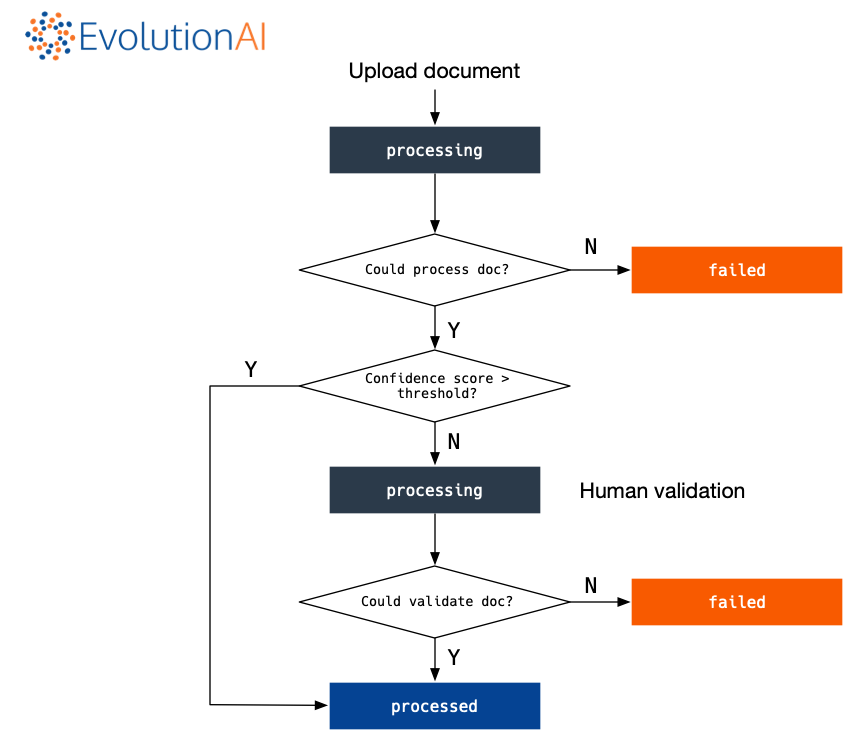
Document status
Responses from the API will contain the document status so that the user knows at which stage of the pipeline the document is. The possible statuses of a document are illustrated in the coloured rectangles in the following chart:
Authentication
Each request must be authenticated. Currently each user is provided with a pre-shared secret key. For every request add a following HTTP header:
X-Auth-Token: [key-provided]
To find your API key visit: https://transcribe.evolution.ai/v1/snippets
Note that you will have a different API key for each organisation you belong to.
Error responses
All error responses will return a status code of 4XX or 5XX and a json payload with details rergarding the error. The json payload schema is identical for all errors.
Example error response:
HTTP/1.1 400 Bad Request
Content-Type: application/json

{
  "success": false,
  "status": 400,
  "message": "Some details about the error"
}
General error codes
400: request contained errors. Check the message for more details.401/403: User not authorized to access the resource/method.404: resouce not found.500: server-side error.
Endpoints
Upload new Document
- POST /v1/documents/
Posts new document for processing
- Request Headers
X-Auth-Token – pre-shared authentication key
- Form Parameters
file – file to process
document_type – document type of file
If no document type is specified and automatic classification is available, the document will be automatically classified into a document type.
If only one document type is available, the document will be classified as this type.
If no document types are available and automatic classification is not available, you will need to add document types via the web interface.
A custom metadata object can optionally be specified at upload time; this could be useful
to provide some extra information that is already available before upload. This needs
to be a valid json` object serialised to a string.
The metadata must take the form of a dictionary with string keys and values
of type str, int, float or list of these types.
If the metadata is not valid, a 400 error will be returned.
Example request:
POST /v1/documents/ HTTP/1.1
Host: transcribe.evolution.ai
X-Auth-Token: 2323b068-5a74-4ac361e2eae1-782d-4db3
Accept: application/json
Example curl request:
curl -H “X-Auth-Token: 2323b068-5a74-4ac361e2eae1-782d-4db3” \
-X POST -F file=@my_file.pdf -F document_type=invoice \
-F metadata='{"some_key": "some metadata"}' \
https://transcribe.evolution.ai/v1/documents/
Example response:
HTTP/1.1 200 OK
Content-Type: application/json

{
  "id" : "7s6Yukm6pzMonwywpLZKf8",
  "filename": "my_file.pdf",
  "status" : "processing"
}
Endpoint specific errors:
If one of the uploaded documents’ type is not supported the following error response will be returned:
HTTP/1.1 415 Unsupported Media Type
Content-Type: application/json

{
  "success": false,
  "status": 415,
  "message": "File type not supported"
}
If one of the uploaded documents is encrypted, the following error response will be returned:
HTTP/1.1 400 Bad Request
Content-Type: application/json

{
  "success": false,
  "status": 400,
  "message": "Cannot process encrypted files."
}
Upload a batch of documents
- POST /v1/documents/batch
Posts new document for processing
- Request Headers
X-Auth-Token – pre-shared authentication key
- Form Parameters
file – a list of files to process
document_type – document type of file
This endpoint works analogously to the single document case. The only difference is that a list of documents is uploaded and a corresponding list of document ids/metadata is received as a response.
Note: all documents in the batch will be uploaded with the same document_type value.
When uploading a batch of documents, the metadata can be specified in two ways:
a single (serialised)
jsonobject which will be applied to all the uploaded files;a (serialised) list of
jsonobjects, one for each file; if the length of the list does not match the number of files uploaded, the API will return a 400 error.
Example request:
POST /v1/documents/ HTTP/1.1
Host: transcribe.evolution.ai
X-Auth-Token: 2323b068-5a74-4ac361e2eae1-782d-4db3
Accept: application/json
Example curl request:
curl -H “X-Auth-Token: 2323b068-5a74-4ac361e2eae1-782d-4db3” \
-X POST -F file=@my_file_1.pdf -F file=@my_file_2.pdf \
-F document_type=invoice \
-F metadata='[{"some_key": "metadata my_file_1.pdf"}, {"some_key": "metadata my_file_2.pdf"}]' \
https://transcribe.evolution.ai/v1/documents/batch
Example response:
HTTP/1.1 200 OK
Content-Type: application/json

[
  {
    "created": "Wed, 21 Apr 2021 15:45:44 GMT",
    "last_modified": "Wed, 21 Apr 2021 15:46:34 GMT",
    "filename": "my_file_1.pdf",
    "id": "J9eGu4zcGKjqfxTZtjoBQ8",
    "status": "processing"
  },
  {
    "created": "Wed, 21 Apr 2021 15:45:44 GMT",
    "last_modified": "Wed, 21 Apr 2021 15:46:34 GMT",
    "filename": "my_file_2.pdf",
    "id": "Fg6PBhHQP8ZxULehoiF3e6",
    "status": "processing"
  }
]
Endpoint specific errors:
See Upload new Document.
List uploaded documents
- GET /v1/documents/
Get list of uploaded documents with their status
- Request Headers
X-Auth-Token – pre-shared authentication key
- Parameters
created_before – return only documents uploaded before the specified date
created_after – return only documents uploaded after the specified date
last_modified_before – return only documents modified before the specified date
last_modified_after – return only documents modified after the specified date
sort_by – sort results by one of ‘created’ or ‘last_modified’. Defaults to ‘created’.
sort_asc – sort results in ascending order (no need to specify a value)
limit – number of results to return (if null, defaults to the latest 1000)
Note: the date filters described above must be specified in ISO 8601 format.
GET /v1/documents/ HTTP/1.1
Host: transcribe.evolution.ai
X-Auth-Token: 2323b068-5a74-4ac361e2eae1-782d-4db3
Accept: application/json
Example curl request:
curl -H “X-Auth-Token: 2323b068-5a74-4ac361e2eae1-782d-4db3” \
-X GET https://transcribe.evolution.ai/v1/documents/
Example response:
HTTP/1.1 200 OK
Content-Type: application/json

{
    "documents": [
        {
            "id": "7s6Yukm6pzMonwywpLZKf8",
            "filename": "my_file.pdf",
            "status": "processing",
            "confidence": "N/A",
            "created": "Mon, 11 May 2020 14:24:41 GMT",
            "last_modified": "Mon, 11 May 2020 14:25:30 GMT",
        },
        {
            "id": "4XAsqC7zFa2LvdikpNPh4m",
            "filename": "another_file.pdf",
            "status": "processed",
            "confidence": "high",
            "created": "Tue, 04 Jun 2019 16:18:13 GMT",
            "last_modified": "Tue, 04 Jun 2019 16:19:22 GMT",
        },
        {
            "id": "TAggRRPyAzqXgzSJrpoDGd",
            "filename": "a_bad_file.png",
            "status": "failed",
            "confidence": "N/A",
            "created": "Tue, 04 Jun 2019 14:21:28 GMT",
            "last_modified": "Tue, 04 Jun 2019 14:22:53 GMT",
        },
    ]
}
Example curl request with query parameters:
curl -H “X-Auth-Token: 2323b068-5a74-4ac361e2eae1-782d-4db3” \
-X GET https://transcribe.evolution.ai/v1/documents/?sort_by=last_modified&sort_asc&last_modified_after='2022-01-10T10:10'
Check status/get extracted information from document
- GET /v1/documents/{id}
Get extracted information from document
- Request Headers
X-Auth-Token – pre-shared authentication key
- Parameters
metadata – if true it appends an extra “metadata” key to the JSON output, whose value is the metadata dictionary specified at upload time.
Example request:
GET /v1/documents/7s6Yukm6pzMonwywpLZKf8 HTTP/1.1
Host: transcribe.evolution.ai
X-Auth-Token: 2323b068-5a74-4ac361e2eae1-782d-4db3
Accept: application/json
Example curl request:
curl -H “X-Auth-Token: 2323b068-5a74-4ac361e2eae1-782d-4db3” \
-X GET https://transcribe.evolution.ai/v1/documents/7s6Yukm6pzMonwywpLZKf8
Example response:
HTTP/1.1 200 OK
Content-Type: application/json

{
    "id": "7s6Yukm6pzMonwywpLZKf8",
    "status": "processed",
    "created": "Mon, 11 May 2020 14:24:41 GMT",
    "last_modified": "Mon, 11 May 2020 14:25:30 GMT",
    "confidence": "high",
    "filename": "my_file.pdf",
    "fields": [
        {
            "page": 0,
            "name": "current_assets",
            "value": "GBP 3583",
            "raw_value": "3583",
            "group": 0,
            "group_name": "default",
            "confidence": "high",
            "value_type": "monetary",
            "bounding_box": {
                "left": 0.10,
                "top": 0.23,
                "right": 0.154,
                "bottom": 0.3012
            }
        },
        {
            "page": 0,
            "name": "cash_on_hand",
            "value": "GBP 2345",
            "raw_value": "£ 2345",
            "group": 0,
            "group_name": "default",
            "confidence": "low",
            "value_type": "monetary",
            "bounding_box": {
                "left": 0.80111,
                "top": 0.43,
                "right": 0.954,
                "bottom": 0.550099
            }
        }
    ],
    "tables": [
        {
            "page": 0,
            "name": "table_1",
            "fields": [
                {
                    "page": 0,
                    "name": "description",
                    "value": "This is a product",
                    "raw_value": "This is a product",
                    "group": 0,
                    "group_name": "table_1",
                    "confidence": "high",
                    "value_type": "text",
                    "bounding_box": {
                        "left": 0.2042,
                        "top": 0.5553,
                        "right": 0.354,
                        "bottom": 0.7501
                    }
                },
                {
                    "page": 0,
                    "name": "description",
                    "value": "This is another product",
                    "raw_value": "This is another product",
                    "group": 1,
                    "group_name": "table_1",
                    "confidence": "high",
                    "value_type": "text",
                    "bounding_box": {
                        "left": 0.2042,
                        "top": 0.7802,
                        "right": 0.354,
                        "bottom": 0.902
                    }
                }
            ]
        }
    ],
    "notes": [
        {
            "created": "Mon, 08 Mar 2021 12:44:59 GMT",
            "document_id": "8j2GW3KNEafCcLwfXimvf2",
            "email": "[email protected]",
            "id": "hNabbfgNNQKrtTRFEcTJTF",
            "page_id": "MDi4AaM98SEsaRzd9NeDsg",
            "resolved": true,
            "resolved_by": "[email protected]",
            "resolved_timestamp": "Mon, 08 Mar 2021 13:26:39 GMT",
            "revalidate": false,
            "text": "This is a note."
        }
    ],
    "pages": [
        {
            "url": "https://transcribe.evolution.ai/documents/page/5XxX75UU18EuccxPVPmQUB/img.png",
            "classification": "balance_sheet",
            "id": "5XxX75UU18EuccxPVPmQUB",
            "page_number": 0,
            "subdocument_idx": -1
        }
    ]
}
Delete document
- DELETE /v1/documents/{id}
Delete document
- Request Headers
X-Auth-Token – pre-shared authentication key
Example request:
DELETE /v1/documents/7s6Yukm6pzMonwywpLZKf8 HTTP/1.1
Host: transcribe.evolution.ai
X-Auth-Token: 2323b068-5a74-4ac361e2eae1-782d-4db3
Example curl request:
curl -H "X-Auth-Token: 2323b068-5a74-4ac361e2eae1-782d-4db3" \
-X DELETE https://transcribe.evolution.ai/v1/documents/7s6Yukm6pzMonwywpLZKf8
Example response:
HTTP/1.1 200 OK
Content-Type: application/json

{
    "id": "7s6Yukm6pzMonwywpLZKf8",
    "status": "deleted",
    "filename": "my_file.pdf"
}
Download original document
- GET /v1/documents/{id}/file
Download the original document that was uploaded to Transcribe AI.
- Request Headers
X-Auth-Token – pre-shared authentication key
Example request:
GET /v1/documents/7s6Yukm6pzMonwywpLZKf8/file HTTP/1.1
Host: transcribe.evolution.ai
X-Auth-Token: 2323b068-5a74-4ac361e2eae1-782d-4db3
Example curl request:
curl -H "X-Auth-Token: 2323b068-5a74-4ac361e2eae1-782d-4db3" \
-X GET https://transcribe.evolution.ai/v1/documents/7s6Yukm6pzMonwywpLZKf8/file \
-OJ
NOTE: specify the -OJ flags to download the file with the original filename.
Example response:
HTTP/1.1 200 OK
Content-Disposition: attachment; filename=my_file.pdf
Content-Type: application/pdf

...binary file...
Download page image
- GET /v1/images/{id}
Download page image as a base64 encoded png
- Request Headers
X-Auth-Token – pre-shared authentication key
- Parameters
webp – whether to return image as
pngorwebp(defaults to false, i.e.png)
Example request:
GET /v1/images/5XxX75UU18EuccxPVPmQUB HTTP/1.1
Host: transcribe.evolution.ai
X-Auth-Token: 2323b068-5a74-4ac361e2eae1-782d-4db3
Example curl request:
curl -H "X-Auth-Token: 2323b068-5a74-4ac361e2eae1-782d-4db3" \
-X GET https://transcribe.evolution.ai/v1/images/5XxX75UU18EuccxPVPmQUB
Example response:
HTTP/1.1 200 OK
Content-Type: application/json

{
    "image": "...base64 encoded image string..."
}
Submit feedback
- POST /v1/documents/{id}/notes
If the extracted data contains errors, it is possible to post a note and optionally to have the document re-validated. Note that if the organization has a multi-stage workflow set-up, then re-validating a document will require it to go through all the steps in the workflow.
- Request Headers
X-Auth-Token – pre-shared authentication key
- JSON Parameters
text – the content of the note
revalidate – boolean indicating whether to re-validate the document (defaults to false)
Example request:
POST /v1/documents/7s6Yukm6pzMonwywpLZKf8/notes HTTP/1.1
Host: transcribe.evolution.ai
X-Auth-Token: 2323b068-5a74-4ac361e2eae1-782d-4db3
Content-Type: application/json

{
    "text": "The content of the note",
    "revalidate": true
}
Example curl request:
curl -H "X-Auth-Token: 2323b068-5a74-4ac361e2eae1-782d-4db3" \
-H "Content-Type: application/json" \
-X POST https://transcribe.evolution.ai/v1/documents/7s6Yukm6pzMonwywpLZKf8/notes \
-d '{"text": "The content of the note", "revalidate": true}'
Example response:
HTTP/1.1 200 OK
Content-Type: application/json

{
    "id": "7s6Yukm6pzMonwywpLZKf8",
}
Webhook
You can specify a webhook to which Transcribe AI can post status updates regarding your documents.
Example payload
{
  "id": "fTgsJCoii5iVpTzvnngCdb",
  "url": "https://transcribe.evolution.ai/v1/documents/fTgsJCoii5iVpTzvnngCdb",
  "status": "processed",
  "status_changed": "2020-11-25T18:29:08.013038",
  "last_modified": "2020-11-25T18:29:08.013038",
  "event": "status_updated"
}
The status key can take the values processed or failed.
The url is the api endpoint for retrieving the extracted data (see Check status/get extracted information from document)
The event key identifies to what type of event the notification refers. Supported
events: “status_updated”, “new_note”, “note_resolved” and “document_resubmitted”.
Development
For developing the endpoint receiving the above payload, you can use the following mock curl snippet
WEBHOOK=https://YOUR_WEBHOOK

curl -H 'Content-Type: application/json' \
-d '{"id":"fTgsJCoii5iVpTzvnngCdb","url":"https://transcribe.evolution.ai/v1/documents/fTgsJCoii5iVpTzvnngCdb","status":"processed","status_changed":"2020-11-25T18:29:08.013038"}' \
-X POST $WEBHOOK
CSRF Token
Note that if you are using CSRF protection, you will need to disable it for the webhook endpoint.
Footnotes
- 1
Supported formats:
.pdf,.png,.tiff,.gif,.webp,.doc,.docx,.bmp